How do you tell a real customer from an automated attacker pretending to be one?
Modern bots are sophisticated. They run real browsers via headless Chromium, rotate residential IPs, solve CAPTCHAs with cheap human labor or ML, and mimic human mouse movement. Block too aggressively and you lose conversions. Block too leniently and bots steal inventory (sneakers, concert tickets), stuff credentials, scrape pricing, or DDoS your login endpoint. Meanwhile, your origin pays for every request — bot or not.
How it fits together
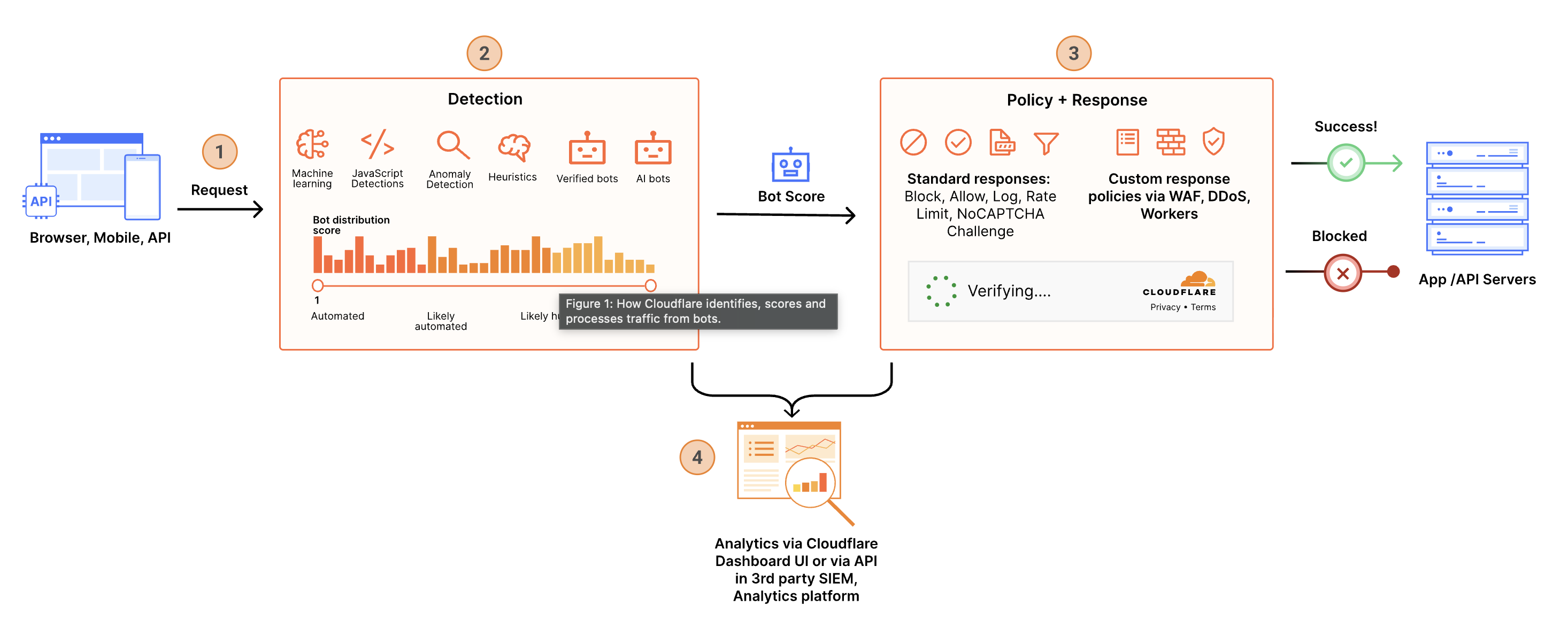 ⤢ Click to enlarge
How Cloudflare solves it
- Protection on every plan. Free zones can enable Bot Fight Mode's fixed computational challenge. Pro adds configurable Super Bot Fight Mode controls for definitely automated and verified traffic. Business adds likely-automated detection, while Enterprise Bot Management exposes the full 1–99 score and advanced signals.
- Multiple detection engines. Cloudflare combines deterministic heuristics, machine learning, client-side signals, and verified-bot validation. Enterprise Bot Management adds domain-specific analysis and exposes JA3/JA4 fingerprints, detection IDs, signed-agent status, and other fields for precise policies.
- Continuous session verification with Precursor. Available across all plans, Precursor repeatedly evaluates browser behavior instead of relying on one request or challenge. It updates session state in the cf_clearance cookie, contributes context to bot scores, and can re-verify a visitor when behavior changes. Choose Minimize Friction for background verification or Maximize Security to require a valid session, then use Precursor Rules to apply modes by path or hostname.
- Verified bots and agents. Cloudflare validates legitimate automation such as search crawlers, monitoring services, and signed agents. Paid plans provide explicit controls, and Enterprise Bot Management can target verified-bot categories or individual detections.
- Granular Enterprise policy. Enterprise Bot Management customers can combine bot score and bot fields with path, IP, method, or other request properties in WAF custom rules, Workers, Transform Rules, rate limiting rules, analytics, and logs.
- Rate limiting as a second layer. Rate limiting controls request frequency rather than classifying the requester. Available parameters vary by plan; Enterprise Bot Management signals can be combined with advanced rate limiting to slow credential stuffing, scraping, and inventory abuse without applying one threshold to every visitor.
- AI crawler controls on every plan. All plans include behavior-based AI bot policies, AI Labyrinth, managed robots.txt, and AI Crawl Control for crawler visibility and per-crawler allow or block decisions. Enterprise Bot Management adds BotBase and business-impact attribution.
Bot Fight Mode vs. Super Bot Fight Mode vs. Bot Management
Four plan experiences, progressively deeper detection, control, and visibility. Enterprise zones without the Bot Management add-on receive the Business version of Super Bot Fight Mode.
Cloudflare provides bot protection on every plan. What changes is how deep the detection goes, how much control you get over the action taken, and how much visibility you have into what got caught.
Bot Fight Mode
Domain-wide protection for simple bots and headless browsers. Fixed challenge with no WAF custom-rule exceptions.
Super Bot Fight Mode
Configurable actions for definitely automated and verified traffic, plus a 24-hour Bot Report.
Super Bot Fight Mode
Adds many sophisticated and likely automated bots, plus the dedicated Bot Analytics dashboard.
Enterprise Bot Management
Granular scores, advanced signals, custom rules, richer analytics, and new bot intelligence tools.
| Feature | Bot Fight Mode Free | Super Bot Fight Mode Pro | Super Bot Fight Mode Business (or Enterprise without the add-on) | Enterprise Bot Management Enterprise add-on |
|---|---|---|---|---|
| Simple bots and headless browsers Cloud-hosting-provider traffic, scripted clients, unmasked headless Chromium. | ✓ | ✓ | ✓ | ✓ |
| Many sophisticated bots Broader machine-learning detection beyond simple known patterns. | — | — | ✓ | ✓ |
| Domain-specific anomaly detection Detection tuned to unusual behavior on the customer's own domain. | — | — | — | ✓ |
| Fixed computational challenge Bot Fight Mode's only response to traffic matching known bot patterns. | Only action | — | — | — |
| Configure definitely automated traffic Choose allow, block, or challenge for score-1 automation. | — | ✓ | ✓ | Custom rules |
| Configure likely automated traffic Choose an action for the score 2-29 grouping or write a custom threshold. | — | — | ✓ | Custom rules |
| Verified bot and agent controls Control validated search crawlers, monitoring tools, and signed agents. | — | ✓ | ✓ | Categories / rules |
| Path, IP, method, and request-level scope Apply bot policy to selected traffic instead of one domain-wide configuration. | Domain-wide | Domain-wide | Domain-wide | ✓ |
| WAF Skip exceptions Exempt approved traffic from Super Bot Fight Mode; Bot Fight Mode cannot be skipped. | — | ✓ | ✓ | Use custom rules |
| Static resource protection Include images, CSS, JavaScript, documents, fonts, and other listed file types. | — | ✓ | ✓ | ✓ |
| JavaScript Detections One-time browser-side signals; Precursor disables and supersedes JSD when enabled. | Automatic without Precursor | Optional | Optional | Optional + field |
| Precursor session-based detection Continuously evaluates behavior, updates session state, and can re-verify visitors as behavior changes. | ✓ | ✓ | ✓ | ✓ |
| Precursor modes and scoped rules Choose Minimize Friction or Maximize Security globally and override the mode by path or hostname. | ✓ | ✓ | ✓ | ✓ |
| Optimize for WordPress Reduces false positives against common WordPress plugin traffic. | — | ✓ | ✓ | ✓ |
| Bot traffic visibility Free actions appear in Security Events; paid tiers add progressively richer analysis. | Security Events | 24h Bot Report | 72h views / 30d history | 7d views / 30d history |
| Granular 1–99 bot score in custom rules Write rules against the exact score, not just a fixed category. | — | — | — | ✓ |
| Advanced Bot Management fields JA3/JA4, detection IDs, signed agent, corporate proxy, static-resource, and JS result fields. | — | — | — | ✓ |
| Bot tags in Logpush Add context about why a request received its bot score. | — | — | — | ✓ |
| Use bot data outside WAF custom rules Consume or forward signals with Workers, rate limiting, Transform Rules, Snippets, analytics, or logs. | — | — | — | ✓ |
| BotBase directory Search Cloudflare's bot and agent directory, inspect classifications, and copy detection IDs. | — | — | — | ✓ |
| Attribution Business Insights Compare crawler volume with referral value over 24 hours, 7 days, or 30 days. | — | — | — | ✓ |
| Bot Feedback Loop Report false positives and negatives to improve future machine-learning models. | — | — | — | ✓ |
| Machine-learning model auto-updates Opt into the newest maintained Enterprise Bot Management model as versions are released. | — | — | — | ✓ |
| Bot detection alerts Notifications for anomalous bot spikes; included with accounts that have an Enterprise zone. | — | — | Enterprise zones | ✓ |
| Account Abuse Protection Early Access fraud signals for login and registration abuse; contact the account team. | — | — | — | Early Access |
| AI behavior policies Allow or block Search, Agent, and Training behavior across the zone or on pages with ads. | ✓ | ✓ | ✓ | ✓ |
| AI Crawl Control Monitor AI traffic, control individual crawlers, and track robots.txt compliance. | ✓ | ✓ | ✓ | ✓ |
| AI Labyrinth Add invisible nofollow honeypot links for unauthorized crawlers that ignore guidance. | ✓ | ✓ | ✓ | ✓ |
| Managed robots.txt for AI crawlers Publish or merge advisory AI crawler instructions; blocking policies provide enforcement. | ✓ | ✓ | ✓ | ✓ |
Common questions
Will this affect good bots like Googlebot or Bingbot?
cf.bot_management.verified_bot, verified-bot categories, or detection IDs in custom rules. Bot Fight Mode on Free has no explicit verified-bot control, so review Security Events for false positives.How is bot management different from rate limiting?
How is Precursor different from JavaScript Detections and Challenges?
What if my real users score low?
Does this also stop the AI scrapers training on my content?
Try it live
Your current request's Enterprise Bot Management score is shown below when available (copied into a custom demo cookie by the site middleware). Hit the rate-limit endpoint repeatedly to trigger a 429.
Your current bot score
Read from this site's custom _cfbm
demo cookie. The middleware copies Cloudflare's request signal into it so client-side code can display
the result. 1 = definitely automated; 30–99 = likely human.
Bot Score
Verified Bot
Verified bots (Googlebot, Bingbot, monitoring tools) are explicitly allowed by default.
Rate limiting test
Hit the rate-limit endpoint as fast as you can. A rate-limit rule
configured on
/api/rate-limit-test
will return 429 once you cross the threshold.
Docs & blogs
Documentation
✓ Verified against Cloudflare docs on 2026-09-08