How do you tell a real customer from an automated attacker pretending to be one?
Modern bots are sophisticated. They run real browsers via headless Chromium, rotate residential IPs, solve CAPTCHAs with cheap human labor or ML, and mimic human mouse movement. Block too aggressively and you lose conversions. Block too leniently and bots steal inventory (sneakers, concert tickets), stuff credentials, scrape pricing, or DDoS your login endpoint. Meanwhile, your origin pays for every request — bot or not.
How it fits together
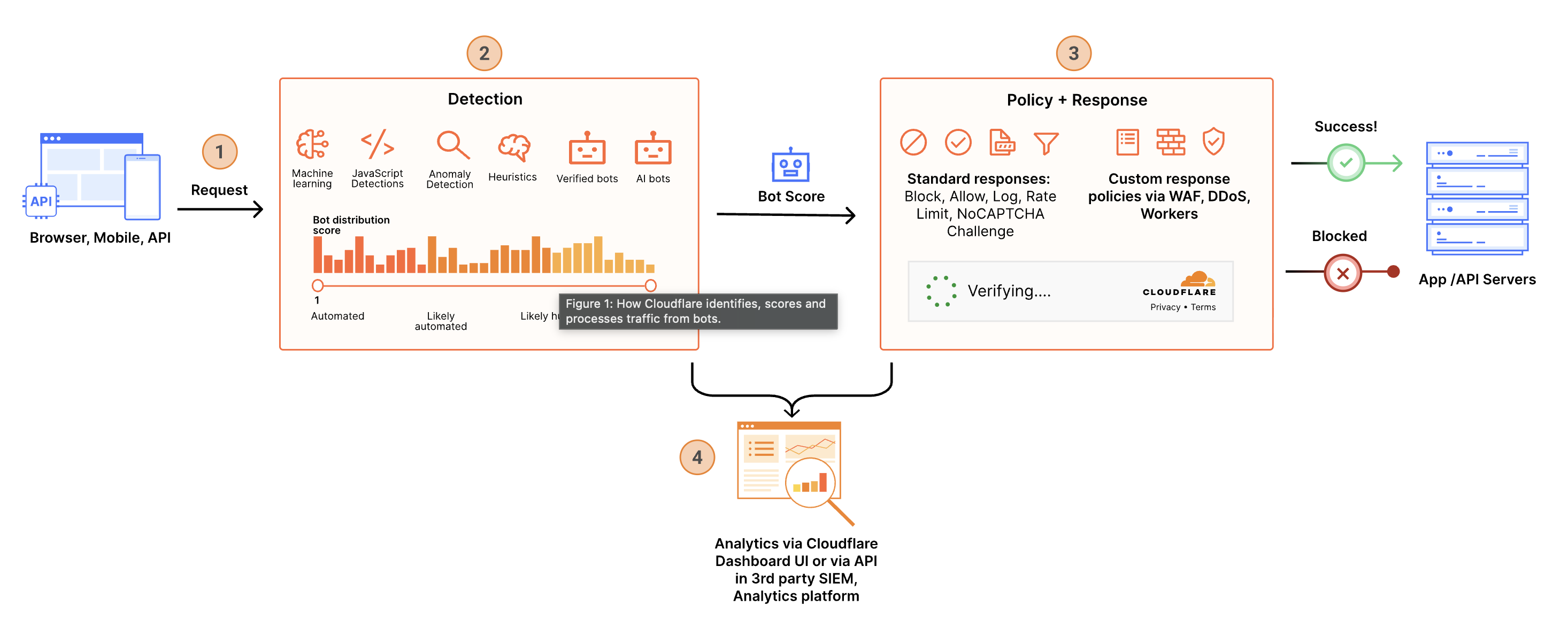 ⤢ Click to enlarge
How Cloudflare solves it
- Machine-learning bot scores. Every request gets a score from 1 (definitely bot) to 99 (definitely human). The model is trained on traffic from millions of sites globally — Cloudflare sees roughly 20% of the entire web.
- Behavioral & JA3/JA4 fingerprinting. Beyond IP and user-agent, Cloudflare evaluates TLS fingerprints, HTTP/2 frame ordering, and behavioral signals (mouse, scroll, timing) when JS detections fire. Bots that perfectly mimic Chrome still fail these checks.
- Verified bots are first-class citizens. Cloudflare maintains a list of good bots (Googlebot, Bingbot, monitoring tools, RSS readers). They're allowed by default and tagged separately, so you can write rules like 'block all bots except verified ones.'
- Rate limiting on any signal. Limit by IP, by cookie, by JA3, by header, by URL pattern. Use sliding windows, configurable thresholds, and action gradients (challenge → JS challenge → block). Stop credential stuffing without locking out real users.
- Surgical actions. Block, JS-challenge, managed challenge (Turnstile), rate-limit, log, or skip — picked per rule. Combine with WAF rules for layered defense (e.g. 'rate-limit logins to 5/min AND challenge on bot score < 30').
Bot Fight Mode vs. Super Bot Fight Mode vs. Bot Management
Four products, one detection engine — the difference is how deep the detection goes and how much control you get over the response.
All four products run on the same underlying bot-detection engine — what changes per plan is how deep the detection goes, how much control you get over the action taken, and how much visibility you have into what got caught.
Bot Fight Mode
One-click hygiene against obvious bots. Challenge action only, no configuration.
Super Bot Fight Mode
Choose allow, block, or challenge for definitely-automated traffic, plus a Bot Report.
Super Bot Fight Mode
Adds detection of likely-automated bots and a dedicated Bot Analytics tool.
Bot Management
Per-request 1–99 bot score, custom rules, fingerprinting, and origin forwarding.
| Feature | Bot Fight Mode Free | Super Bot Fight Mode Pro | Super Bot Fight Mode Business (or Enterprise without the add-on) | Bot Management Enterprise add-on |
|---|---|---|---|---|
| Detects simple bots & headless browsers Cloud-hosting-provider traffic, scripted clients, unmasked headless Chromium. | ✓ | ✓ | ✓ | ✓ |
| Detects sophisticated, ML-evasive bots Bots that mimic human behavior closely enough to fool simple heuristics. | — | — | ✓ | ✓ |
| Choose the action (allow / block / challenge) Free issues a fixed challenge; paid tiers let you pick per bot category. | Challenge only | ✓ | ✓ | ✓ |
| Block or challenge definitely-automated traffic Score band representing obvious automation. | ✓ | ✓ | ✓ | Via custom rules |
| Block or challenge likely-automated traffic Score band for harder-to-detect automation — not available on Pro. | — | — | ✓ | Via custom rules |
| Verified-bot allow / block controls Explicit control over Googlebot, Bingbot, uptime monitors, etc. | — | ✓ | ✓ | ✓ |
| Static resource protection Exempt images, CSS, and other static file types from bot checks. | — | ✓ | ✓ | ✓ |
| JavaScript Detections Client-side signals injected to catch bots that don't run JS. | Forced on | ✓ | ✓ | ✓ |
| Optimize for WordPress Reduces false positives against common WordPress plugin traffic. | — | ✓ | ✓ | ✓ |
| WAF custom-rule exceptions (Skip action) Runs on the Ruleset Engine, so you can carve out approved automated traffic. | — | ✓ | ✓ | ✓ |
| Bot traffic analytics Depth of reporting on what's hitting your domain. | — | Bot Report | Bot Analytics tool | Bot Analytics + BotBase |
| Granular 1–99 bot score in custom rules Write rules against the exact score, not just a fixed category. | — | — | — | ✓ |
| JA3 / JA4 fingerprinting & bot tags Identify clients by TLS handshake signature or named bot tag. | — | — | — | ✓ |
| Detection IDs (target individual bots) Write rules against a specific detection, not just a score band. | — | — | — | ✓ |
| Restrict scope by path, IP, and more Apply bot logic surgically instead of domain-wide. | — | — | — | ✓ |
| Forward bot score to origin Send the score to your app/SIEM via Transform Rules or Snippets. | — | — | — | ✓ |
| AI bot controls (block, AI Labyrinth, robots.txt) Presets to manage AI crawlers, agents, and training scrapers. | ✓ | ✓ | ✓ | ✓ |
Common questions
Will this affect good bots like Googlebot or Bingbot?
cf.client.bot. Default rules let verified bots through; you write your blocks to apply only to cf.bot_management.score < 30 AND NOT cf.client.bot. Search engines, RSS aggregators, and monitoring services keep working.How is bot management different from rate limiting?
What if my real users score low?
Does this also stop the AI scrapers training on my content?
Try it live
Your current request's bot management score is shown below (injected by the site middleware). Hit the rate-limit endpoint repeatedly to trigger a 429.
Your current bot management score
Read from the _cfbm cookie
set by Cloudflare on each request to this site. 1 = definitely bot,
99 = definitely human. The site middleware injects this so we can show it on the page.
Bot Score
Verified Bot
Verified bots (Googlebot, Bingbot, monitoring tools) are explicitly allowed by default.
Rate limiting test
Hit the rate-limit endpoint as fast as you can. A rate-limit rule
configured on
/api/rate-limit-test
will return 429 once you cross the threshold.